Cadrage Studio Combines a Bunch of Pre-Production Filmmaking Tools In One App
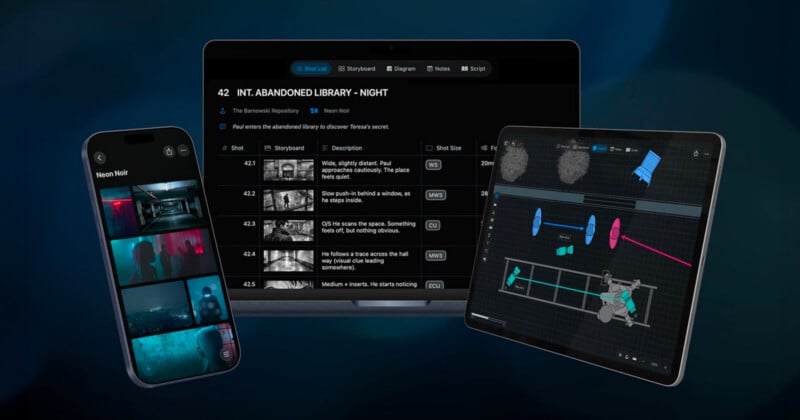
Cadrage has launched Cadrage Studio, a new preproduction platform designed to bring together many of the tools filmmakers use before production into a single application. Built by the team behind the Cadrage director’s viewfinder app, the new software combines shot lists, storyboards, camera diagrams, mood boards, script management, and location planning within one collaborative workspace.
The company says Cadrage Studio is intended to simplify the often fragmented preproduction process by connecting every asset directly to the scene where it belongs, reducing the need to organize files across multiple applications and shared folders.
“Pre-production gets messy fast. Cadrage Studio brings it all into one place: shot lists, camera diagrams, storyboards, mood boards, and locations, with every element connected to the scene it belongs to. No more digging through shared folders, email attachments, and scattered apps to find what you need,” Cadrage says.
“Whether you’re prepping a feature, a commercial, or a music video, Cadrage Studio adapts to your process and keeps everything structured for a clean handoff to every department. Directors, cinematographers, assistant directors, gaffers, and production designers stay aligned from first concept to first day of shooting. Spend your energy on the work that matters and arrive on set with everything organized.”
The company says the new platform is built on the success of its original Cadrage viewfinder app, which it says is trusted by more than 100,000 filmmakers worldwide.
One Platform for Visual Planning Tools
Rather than separating shot lists, storyboards, camera diagrams, and reference material into different applications, Cadrage Studio organizes everything around individual scenes. Camera diagrams, mood boards, locations, and storyboards remain linked together throughout production planning, making it easier for directors, cinematographers, assistant directors, production designers, and other departments to reference the same information.
According to Cadrage, the goal is to reduce the amount of time spent searching through emails, cloud folders, and disconnected planning tools before a production begins.
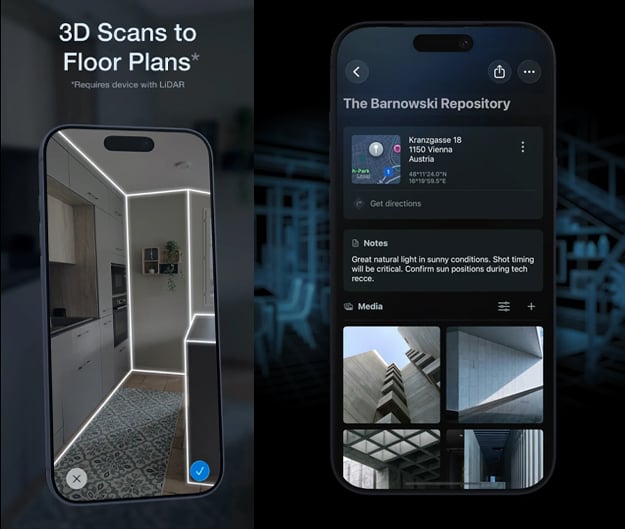
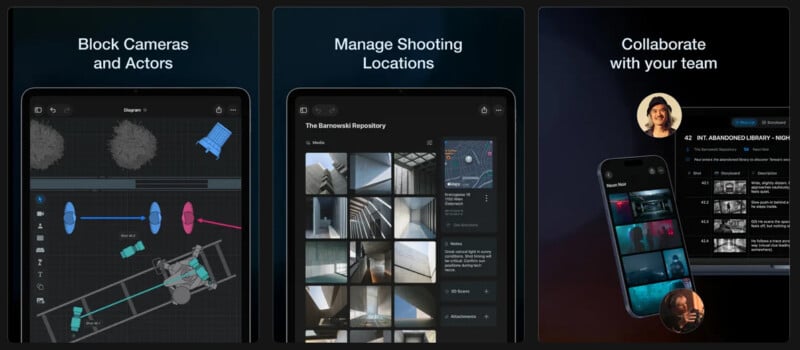
One of the application’s core features is its camera diagram system, allowing filmmakers to build overhead scene layouts using cameras, actors, lights, and set pieces positioned to scale. Productions can also import 3D room scans to create more accurate floor plans during location planning.
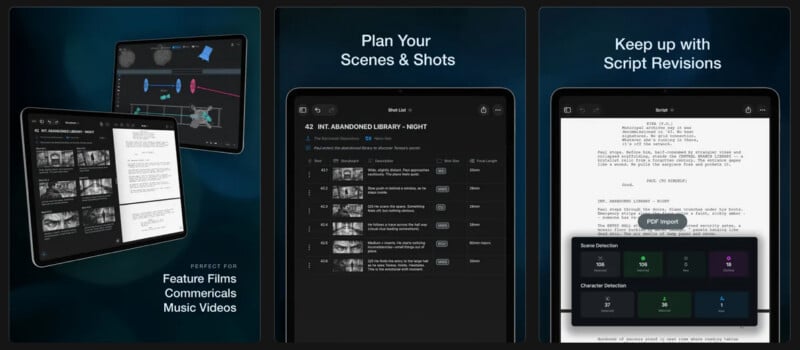
Shot lists include customizable metadata fields, while storyboards automatically connect to their corresponding camera diagrams and scenes. Mood boards and locations are likewise attached to individual scenes to keep production materials organized throughout the project.
Cadrage Studio also includes script import functionality that automatically detects scenes and characters. As revised scripts are imported, the application keeps connected assets attached to the appropriate scenes, allowing production documents to remain synchronized without requiring users to reorganize shot lists or diagrams manually.
The company says this approach helps reduce disruptions as scripts evolve during preproduction.
Location Scouting and Collaboration
Location management includes support for LiDAR room scanning on compatible iPhone and iPad models, allowing users to capture 3D representations of locations directly within the app. Additional photos and notes can also be attached to each location for reference by the production team.
Projects synchronize across iPhone, iPad, and Mac using iCloud, while collaboration tools allow multiple crew members to work on the same project simultaneously. Scene-specific PDFs can also be exported for individual departments, giving crews only the information relevant to their responsibilities.
Designed to Work Offline
Cadrage says all project data remains stored within the user’s private iCloud account rather than on company servers. The application also functions offline, allowing filmmakers to continue working in areas without cellular or internet connectivity before automatically syncing changes once a connection becomes available.
“Your data stays in your private iCloud account and is never uploaded anywhere else. Shooting on location without a signal? Cadrage Studio works fully offline, so you can keep working anywhere,” Cadrage says.
The latest update also adds reusable project settings, improved search filtering using tags, linked scene displays for mood boards and locations, camera diagram usability improvements, and bug fixes.
Pricing and Availability
Cadrage Studio is available now for iPhone, iPad, and Mac as a subscription-based service priced at $20 USD per month or $100 USD per year, with a 7-day free trial available for new users. Cadrage notes that the subscription can be canceled at any time before renewal.
Image creditsCadrage Studio, Josh Miller DP